This article is part two, where we integrate the framework agnostic validate library we designed in the previous article with Vue 3 via a useForm composable.
You can find the previous article here and the final source code here.
Designing the Integration Layer
Like the previous article, we will spend a bit of time planning the API and integration before start coding. Examining the prior art shows several successful ways Vue libraries have done form validation:
Vuelidate
Vuelidate provides validation via a validations key which you add to your component:
export default {
  validations: {
    name: {
      required,
      minLength: minLength(4)
    }
  },
  methods: {
    submit() {
      this.$v.$touch()
      if (this.$v.$invalid) {
        // don't submit
      }
    }
  }
}
You can disable a button based on the submitStatus flag:
<button class="button" type="submit" :disabled="submitStatus === 'PENDING'">Submit!</button>VeeValidate
VeeValidate has changed a lot since I last used it, but the concept remains the same: it moves the validation to the template, using a ValidationProvider and ValidationObserver API. I have no idea how this works under the hook. Anyway, it looks like this:
<ValidationObserver v-slot="{ invalid }">
    <form @submit.prevent="onSubmit">
      <ValidationProvider name="E-mail" rules="required|email" v-slot="{ errors }">
        <input v-model="email" type="email">
        <span>{{ errors[0] }}</span>
      </ValidationProvider>
    <button type="submit" :disabled="invalid">Submit</button>
  </form>
</ValidationObserver>
We are going to go for something a bit closer to Vuelidate, and declare our rules in the script tag, via a useForm composable. This is the goal:
<template>
  <form>
    <input v-model="form.username.ref" />
    <div v-if="form.username.error">
      {{ form.username.error }}
    </div>
      <button :disabled="!form.valid">submit</button>
  </form>
</template>

<script lang="ts">
export default defineComponent({
  setup() {
    const { form } = useForm([
      {
        name: 'username',
        value: '',
        rules: [hasLength({ min: 2, max: 3 }), isRequired()],
      }
    ])

    return {
      form
    }
  }
})
</script>
Each input will be created on the reactive form object, which is returned from useForm. form will also have a valid property, which we can use to disable the submit button until the form in valid. Each input will have an error property and a ref property. I like this because it’s nothing special or and there is no magic going on - it’s just an object using Vue’s reactivity API (which is somewhat magic, but at least our library isn’t adding an additional magic).
The MVP Implementation
Before making the useForm hook extremely robust and flexible, let’s start simple - just get it working with one input. Here is the minimal implementation:
export const useForm = (rules: Rule[]) => {
  const form = {
    valid: ref(false),
    username: {
      ref: ref(''),
      error: ref<string | null>(null)
    }
  }

  watch(form.username.ref, val => {
    const status = validate(val, rules)
    if (!status.valid) {
      form.username.error.value = status.message
    } else {
      form.username.error.value = null
    }
  })

  return {
    form
  }
}
This works - it can be used like this:
<template>
  <form>
    <input v-model="form.username.ref" />
    <div v-if="form.username.error">
      {{ form.username.error }}
    </div>
    <button :disabled="!form.valid">submit</button>
  </form>
</template>

<script lang="ts">
import { defineComponent } from 'vue'
import { hasLength, useForm } from './validation'

export default defineComponent({
  name: 'App',

  setup() {
    const { form } = useForm(
      [hasLength({ min: 2, max: 3 })]
    )

    return {
      form
    }
  }
})
</script>
And looks like this:
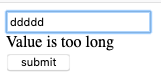
We haven’t implemented form.valid yet, though. Our current approach is a nice prototype, but clearly this won’t scale for multiple inputs - we need something a bit more generic.
Let’s start off by defining the payload for useForm with an interface:
interface FormInput {
  name: string
  value: string
  rules: Rule[]
}
We will require the user pass a name for each input - we can use this dynamically assign the inputs to the form object we create in useForm. The new API now looks like this:
const useForm = (inputs: FormInput[]) => {
  // ...
}

// Usage
const { form } = useForm([
  {
    name: 'username',
    value: '',
    rules: [hasLength({ min: 2, max: 3 })]
  }
])
Now, we need to loop over each of the inputs and create a ref and error property on form:
export const useForm = (inputs: FormInput[]) => {
  const form = {
    valid: ref(false),
  }

  for (const input of inputs) {
    form[input.name] = {
      ref: ref(input.value),
      error: ref<string | null>(null)
    }

    watch(form[input.name].ref, val => {
      const status = validate(val, input.rules)
      if (!status.valid) {
        form[input.name].error.value = status.message
      } else {
        form[input.name].error.value = null
      }
    })
  }

  return {
    form
  }
}
This works, too:
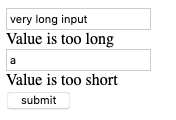
We are doing the exact same thing as before, but it’s just a bit more generic. Nothing too exciting.
Validating the Form
The last thing we need to do is add the form.valid property. This is a little challenging with our current setup: we would need to check every input’s error field every time any input was updated. We could do another loop after each input and check the error property on each input.
Another simple approach is to just define another reactive property to keep track of this for us. This makes this much more simple - however, it is not without it’s downsides: we are introducing duplication, and a second source of truth. This is a trade-off I’m happy to make - if it turns out there are some edge cases, I may reconsider this approach. For now, let’s see it in action. This is the final code for this example.
export const useForm = (inputs: FormInput[]) => {
  const form = {
    valid: ref(false),
  }

  // 1. Create a reactive object with [name]: boolean
  let errors = inputs.reduce<Record<string, boolean>>((acc, curr) => {
    acc[curr.name] = false
    return acc
  }, {})
  errors = reactive(errors)

  for (const input of inputs) {
    errors[input.name] = false
    form[input.name] = {
      ref: ref(input.value),
      error: ref<string | null>(null)
    }

    watch(form[input.name].ref, val => {
      const status = validate(val, input.rules)
      if (!status.valid) {
        form[input.name].error.value = status.message
        // Update errors
        errors[input.name] = false
      } else {
        form[input.name].error.value = null
        // Update errors
        errors[input.name] = true
      }
    })
  }

  // Update form.valid if all fields are valid.
  watch(errors, val => {
    form.valid.value = Object.values(val).every(valid => valid === true)
  })

  return {
    form
  }
}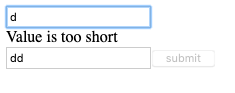
We start by creating a reactive object with a key for each input, and setting them to false by default. Whenever the errors object changes, we check if the form is now valid. This is pretty efficient - watch only runs when a transition from true -> false happens, of vice versa, not on every input.
Conclusion
We build a little validation library in a framework agnostic manner, then we integrated it with our framework of choice (in this case Vue). Integrating with React, Angular, Svelte or any other framework would be just as trivial. We also saw the benefits of framework agnostic design - the tests run fast, and are easy to write.
You can find the full source code for this article here.